
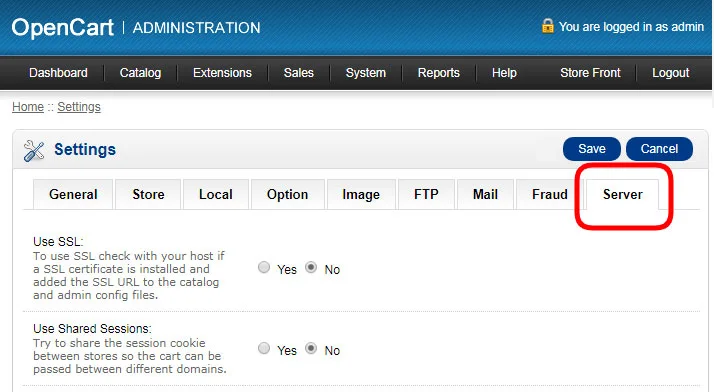
1. In the admin panel of your site go to the settings and click on "edit" in front of your store.

2. Next, go to the "Server" tab
3.At the bottom of this page, insert the Looksize script in the "Google Analytics Code" field, if in this field you already have another script, paste the code after it.
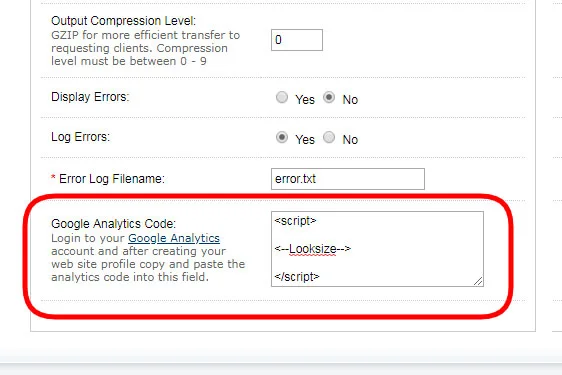
4. After you have inserted the script, be sure to save the changes in the upper right corner of the page.

New articles
Virtual Try-On: The Future of Shopping and Fashion Personalization

In this post, we will try to introduce you to how the virtual try-on clothes software is revolutionizing and...

Leveraging Artificial Intelligence in the Fashion Industry

Let's take a look at how AI is transforming the fashion industry — from optimizing planning processes and creating...

Clothing size calculator: Your essential tool for a perfect fit and confident online shopping

With the growing popularity of online shopping, online retailers and their visitors are increasingly faced with the...

Fashion Augmented Reality App: Pros and Cons

Augmented reality (AR) in fashion is a technology that adds digital elements to the real world, creating interactive...

Fashion Retail Technology: Unlocking New Frontiers in Digital Shopping

The e-commerce industry is currently experiencing rapid development, driven by the emergence of new technology in...